Posts

Showing posts with the label webos

Plan 9: Share Media Content with TV via UPnP

Image
  Share media content with UPnP / DLNA capable players. This is a proof-of-concept of network programming  (TCP and UDP)  in Plan 9. For information, man udp is a useful place to get started. # Server - shares /mnt/media upnp/server 10.0.2.15   # Client upnp/fs 10.0.2.15 ls /n/upnp echo refresh > /n/upnp/ctl     Device Quirks VLC VLC looks for "urn:schemas-upnp-org:service:ContentDirectory:1" instead of "urn:schemas-upnp-org:device:MediaServer:1" during M-SEARCH.   LG WebOS TV   LG WebOS TV needs the services "urn:schemas-upnp-org:service:ConnectionManager:1" and "urn:microsoft.com:service:X_MS_MediaReceiverRegistrar:1" in addition to "urn:schemas-upnp-org:service:ContentDirectory:1" in device.xml.   It also seems to remember the UUIDs for a particular IP address. If you change the UUID of our application and it doesn't appear in the TV, restarting the TV might help.  Lessons Learnt Put program assets like XML files in /sys/lib...
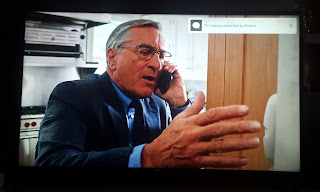
LG WebOS TV and GNU Emacs

Image
Modern LG TVs with WebOS allow remote control via websockets. Since this is a web technology, you might want to automate this using Node JS [1] . However, if you want a fair balance between scripting and interactive use, Emacs will serve you better. Toast (top right) sent from Emacs   Completing LG TV commands in Emacs Steps Install package websocket from ELPA. M-x package-install RET websocket RET  Download tv.el and pairing.json Load tv.el M-x load-library RET tv RET  Ensure variable lgtv--pairing-json is pointing to pairing.json file. Run M-x lgtv-command Enter a command for LG TV. Use TAB for completion. Enter a JSON object for command parameter. Leave empty if the command doesn't require a parameter. ( Note: Remember to quote the keys in JSON.) ;; Sample payload passed to TV. You need to provide URI (without ssap://) and payload parts   ;; Show toast { "id": "0c8b18a10002", "type": "request", "uri": "ssap://system...