Posts

Showing posts with the label GNU Linux

Plan 9: Network Printer (HP Deskjet Ink Advantage 3545)

Image
Internet Printing Protocol Printing with  Internet Printing Protocol (IPP)  involves sending a Unirast   Format (URF) image with appropriate protocol headers to port 631. It is the basis for standards like  Windows Mopria Alliance , Apple   AirPrint , and IPP Everywhere .  It is also called  Driverless Printing   since this doesn't involve installing any printer specific driver. On Plan 9, printing involves three steps: Convert the document to PDF using lp Convert the PDF to URF using  gs  (use urfgray, urfrgb or urfcmyk device) Send the request to the printer using hget IPP header ( req.bin in the below script) contains page output options like paper size, margins etc. This is generated   using ippenc.c .        #!/bin/rc HOST=$1 FILE=$2 TFILE=/tmp/a.pdf URL=( http://$HOST:631/ipp/print/ ) if (! ~ $#* 2)    echo 'Usage: $0 <printer-ip> <file>'     lp -d stdout $FILE > $TFILE...

Emacs: Binary File Viewer

Image
  Quick visualization tool for Binary data using C header definition. Semantic parses the C header file and generates a type definition. The type definition is passed to bindat-unpack along with the binary data. The result is displayed using speedbar . ;; Note: The command works on the binary data in the current buffer.   M-x hexl-form   (hexl-form)      The image shows the example included in the commentary section of bindat.el .   Conversions (format "%02X" 255) ;; => "FF" (string-to-number "FF" 16) ;; => 255   ;; Little endian unpacking (let* ((bindat-raw [1 2 3 4 5 6 7 8])           (bindat-idx 0))   (bindat--unpack-u64r))   ;; Little endian packing (let* ((bindat-raw [0 0 0 0 0 0 0 0])           (bindat-idx 0))   (bindat--pack-u64r #x0102030405060708)   bindat-raw)      Insert Binary Data Emacs creates a multibyte buffer ...

CEDET: Across the Language Barrier

Image
Emacs at its core is a Lisp interpreter written in C. If you are an Emacs developer, this means you often need to jump between C and Lisp programming languages. CEDET is capable of maintaining project-wide tag database and hence allows the user to seamlessly jump across the definitions in either C or Lisp.    Demo: Jump to definition across Lisp and C (including pre-processor) using CEDET . Note: Emacs provides necessary tools to make development easier.  find-function will also do the job. However, this article is about CEDET. Another useful application is when you are editing an HTML which usually entails editing HTML, CSS and JS. Setup instructions are here: https://lifeofpenguin.blogspot.com/2021/04/gnu-emacs-as-lightweight-ide.html

Screen mirroring using GNU Emacs

Image
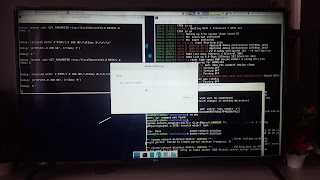
Screen mirroring using GNU Emacs from Debian XFCE to LG UJ632T   Note: Don't forget to quit properly (or use wpa_cli p2p_cancel ). Else your computer will continue to scan for peers in the background. Config (require 'tv) (setq wfd-wpa-cli " /usr/sbin/wpa_cli ")   Code https://gitlab.com/atamariya/emacs/-/blob/dev/lisp/tv.el https://gitlab.com/atamariya/hostap/-/blob/tools/wpaspy/wfd.py (RTSP server)   Setup We need to be able to run wpa_cli and nmcli as a normal user. Hence we will add the user and the tools to netdev group.   - Edit /usr/lib/systemd/system/wpa_supplicant.service (as root) ExecStart=/sbin/wpa_supplicant -u -s -O /run/wpa_supplicant -G netdev   - Restart wpa_supplicant (as root). systemctl daemon-reload service wpa_supplicant restart    - Modify user group, file permissions and path. sudo adduser <username> netdev chown -R :netdev /usr/sbin/wpa_cli /var/run/wpa_supplicant/* export PATH=/usr/sbin:$PATH    - Start th...

Mission control in GNU Emacs

Image
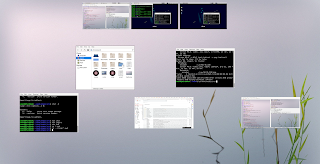
  Mission control or desktop/window overview in GNU Emacs. This is an Emacs buffer showing some images in a fullscreen frame. The first line shows images of workspaces. The rest are images of active windows in current workspace. It uses the following external tools: wmctrl - For switching applications and workspaces xdotool - For getting id of active window xwd - For taking screenshots in XWD format ffmpeg - For scaling and converting XWD to PNG format Install these essential tools in your system.  $ sudo apt install wmctrl xdotool xwd ffmpeg Load library task.el  (require 'task) Run M-x task-view or M-x task-view-fullscreen . Use mouse to select, g to group, G to ungroup, m to start a move operation and ESC to cancel. Use double click to activate a window or desktop. Press q or RET to exit. Pro Tip: You can select multiple windows.   Code: https://gitlab.com/atamariya/emacs/-/blob/dev/lisp/svg.el https://gitlab.com/atamariya/emacs/-/blob/dev/lisp/task.el ...

Screen Mirroring in GNU Linux

Image
Screen mirroring allows you to display your laptop screen on a TV via Wifi Direct . This is also known as screen casting, Miracast, Wifi Display or Wifi P2P. Usage of Wifi Direct means you don't necessarily need a router or a working network. The data is streamed using RTSP . However, it doesn't use the standard RTSP port. The port information is shared during connection process (usually defaults to 7236 as per Miracast specifications). Also, the RTSP server must support additional Miracast related negotiations. Note: Feature-wise, Second Screen or DIAL (DIscovery And Launch) provides similar experience (primarily for Youtube and Netflix apps). But this (DIAL) requires both the devices to be in the same network. Debian XFCE meets LG 4K TV (UJ632T) The core of this technology in Linux is wpa_supplicant (or its variant - connmand or miracle-wifid). connmand (for WDS ) and miracle-wifid (for MiracleCast ) also manage your network interface. You might also have NetworkManager ...