Posts

Showing posts with the label lg tv

Plan 9: Share Media Content with TV via UPnP

Image
  Share media content with UPnP / DLNA capable players. This is a proof-of-concept of network programming  (TCP and UDP)  in Plan 9. For information, man udp is a useful place to get started.   Device Quirks VLC VLC looks for "urn:schemas-upnp-org:service:ContentDirectory:1" instead of "urn:schemas-upnp-org:device:MediaServer:1" during M-SEARCH.   LG WebOS TV   LG WebOS TV needs the services "urn:schemas-upnp-org:service:ConnectionManager:1" and "urn:microsoft.com:service:X_MS_MediaReceiverRegistrar:1" in addition to "urn:schemas-upnp-org:service:ContentDirectory:1" in device.xml.   It also seems to remember the UUIDs for a particular IP address. If you change the UUID of our application and it doesn't appear in the TV, restarting the TV might help.  Code https://gitlab.com/atamariya/plan9front/-/blob/dev/sys/src/cmd/upnp/server.c  
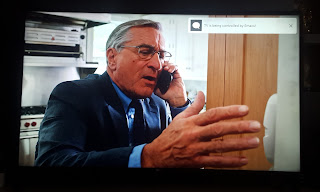
LG WebOS TV and GNU Emacs

Image
Modern LG TVs with WebOS allow remote control via websockets. Since this is a web technology, you might want to automate this using Node JS [1] . However, if you want a fair balance between scripting and interactive use, Emacs will serve you better. Toast (top right) sent from Emacs   Completing LG TV commands in Emacs Steps Install package websocket from ELPA. M-x package-install RET websocket RET  Download tv.el and pairing.json Load tv.el M-x load-library RET tv RET  Ensure variable lgtv--pairing-json is pointing to pairing.json file. Run M-x lgtv-command Enter a command for LG TV. Use TAB for completion. Enter a JSON object for command parameter. Leave empty if the command doesn't require a parameter. ( Note: Remember to quote the keys in JSON.) ;; Sample payload passed to TV. You need to provide URI (without ssap://) and payload parts   ;; Show toast { "id": "0c8b18a10002", "type": "request", "uri": "ssap://system...