Posts

Showing posts with the label webkitgtk2

Offscreen rendering in GTK
Image
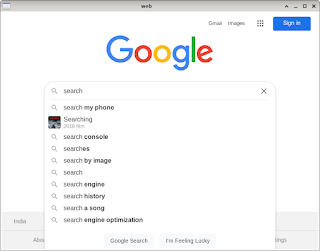
  GTK provides a simple OffscreenWindow API to render content offscreen and then paint a widget with that content on demand. This is important if you want to avoid flickering or don't want to show user the content till it's fully ready. The "draw" event handler of gtk_drawing_area_new widget widget draws webview widget on the cairo surface passed to the handler using gtk_widget_draw (GTK_WIDGET (webView), cr) . Keyboard, mouse and scroll events are copied and forwarded to the webview widget. We can listen to WebKitWebView 's "load-changed" event for blocklist managment. ./browser "http://www.google.com" browser.c #include <gtk/gtkx.h> #include <webkit2/webkit2.h> static gboolean refresh_widget (GtkWidget *widget, GdkEvent *event,                         gpointer xv_widget) {   if (GTK_IS_WIDGET (xv_widget))     gtk_widget_queue_dra...
Browser in GNU Emacs

Image
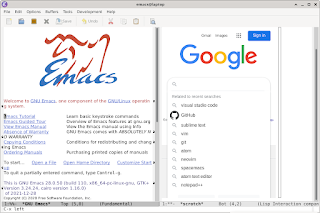
There are two ways to browse rich web on GNU Emacs - both of them involves xwidget. Notice the different symbols ( widget and socket ) passed to (xwidget-insert) command. Apart from the technical difference, widget is keyboard oriented and socket is mouse oriented from usability perspective. Inbuilt webkitgtk2 widget Since it's inbuilt (runs in same process as Emacs), it is better integrated with Emacs compared to the other option. There are keyboard commands to manage the browsing. Though this flickers a lot to suit my taste. Also, input handling is a bit cumbersome.   (setq w (xwidget-insert (point) ' webkit "test" 400 600)) External Surf browser Surf browser also uses webkitgtk2. It's the only browser which supports XEmbed protocol. This means you can use mouse and keyboard normally as you'd do while browsing web.   With my patch , you should be able to invoke surf as below:   (setq w (xwidget-insert (point) ' socket "test" 400 600 '(...