Posts

Showing posts with the label comics

Plan 9: Dynamic HTML

Image
  Render Dynamic HTML using plot and qjs. Render a simple website   Font zoom   E-Book Reader eBook is a collection of HTML files in a ZIP archive. Follow same steps for Comic Book reader which are collection of JPG/PNG images in a ZIP/RAR archive. For columns, pure HTML solution involves column-count CSS property. However, this works only for designed screen sizes. For non-standard sizes, the first column might span multiple pages before continuing in the second column. Hence, the page mode manages the split without relying on the column-count.   Keymap t                          Table of Content -/=                     Font zoom 1,2,3                  Column s                         Toggle scroll/page mode  ...
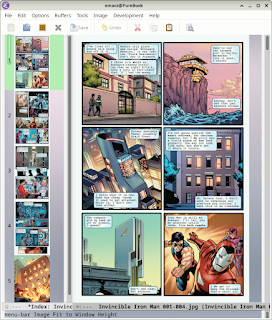
GNU Emacs as a Comic Book Reader

Image
  Comics are available in digital format as a collection of images in a compressed ZIP or RAR file (.cbz or .cbr file extension respectively). These can be enjoyed in GNU Emacs with full access to image viewing capabilities using keybindings.   # Make sure you have unrar installed for CBR files # apt install unrar   (require 'arc2-mode)   (setq archive-summarize-files-fn 'archive-summarize-files-as-thumb)     Note: The archive-mode is capable of displaying the list of files in an archive; though it depends on external tools for extraction. For JPG and PNG, Emacs can resize the image without external convertor (ie. imagemagick). However, some menu options for image transformations in image-mode might not be available. Use the following patch for image-mode.el . @@ -460,16 +460,16 @@ image-mode-map       :help "Show image as hex"]      "--"      ["Fit to Window Height" image-transform-fit-to-...

Comics Builder in GNU Emacs

Image
  Generate comics strip from a script in GNU Emacs. First, create a folder containing artwork. You can use samples from [2]. It should have three subfolders - faces, poses and backgrounds. Images can be GIF, JPG or PNG. Filenames for face and poses follow a convention: <id>-<emotion>.<ext> . Please ensure you have atleast one file for neutral emotion . Set appropriate values for following variables: comics-artwork - Folder containing artwork comics-col-max - Maximum no. of columns (default: 2) comics-emotions - Alist of emotions and words used to describe them comics-avatars - A list of cons cells (FACE-ID . BODY-ID) Open a file containing the script (sample below) and run M-x comics. This will generate an SVG image for the comics strip which will fit the display window. Panels are rendered with fixed font-size so that it is always readable. Actors are assigned an avatar from comics-avatars sequentially as they appear in the script. Normally, all the actors are d...