Posts

Showing posts with the label spellcheck

Plan 9 : The Infinity Notebook

Image
  Plan 9 is an Operating System (OS) from Bell Labs which is a successor to UNIX. It builds on the learnings from the previous Operating systems. Network computing and graphics is an integral part of the OS rather than an afterthought. It is modular and portable - it comes with a cross compiler . It is available, under MIT License , which anybody can use, learn and tweak. Features Everything is a file. Small Kernel:  Around 5MB size which can be built in under 2 minutes.  Singular Grid: All the computers running Plan 9 OS and connected together act like a singular grid. So there's no need for remote access solutions like VNC or RDP. This cool video shows a small glimpse of the possibilities. Process Isolation: Processes run within their own namespaces and are isolated from each other. So you can run rio (the window manager) within rio. Applications like Browsers don't need complicated sandboxing. And a crashing program is unlikely to bring down the OS. No DLL Hell : ...
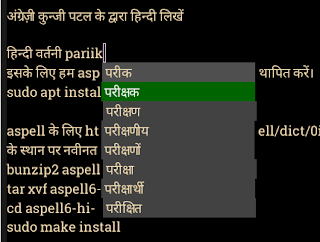
GNU Emacs में हिन्दी लिखें

Image
Note : This article is written using GNU Emacs. नोट : यह लेख GNU Emacs में लिखा गया है।   अब आप हिन्दी लिखने के लिए GNU Emacs का प्रयोग कर सकते हैं । गद्य सम्पादन के लिए Emacs एक बेहतरीन साधन है । हिन्दी के लिए देवनागरी फॉन्ट स्थापित करे आप Noto Sans Devanagari इस URL से प्राप्त कर सकते है। फिर root बनकर ये commands चलाए : # mkdir -p /usr/share/fonts/hindi # cd /usr/share/fonts/hindi # unzip NotoSansDevanagari-hinted.zip # fc-cache -fv अंग्रेज़ी कुन्जी पटल के द्वारा हिन्दी लिखें इसके लिए हम quail और company का प्रयोग करेंगे । Quail एक Input Method Framework है। यह अंग्रेज़ी कुन्जी पटल के keystroke को देवनागरी लिपि के Unicode अक्षरों में परिवर्तित करता है। इन अक्षरों को popup में दर्शाने के लिए हम company का प्रयोग करेंगे जो कि एक Completion UI Framework है। ~/.emacs में लिखें : (setq ispell-alternate-dictionary "/home/aspell6-hi-0.02-0/hi.wl")     हिन्दी वर्तनी परीक्षक इसके लिए हम aspell का प्रयोग करेंगे। aspell  स्थापित करें। sudo apt install aspell aspell के लिए...

Hindi Spell-check and Auto-suggest in Emacs

Image
  Spellcheck Install aspell sudo apt install aspell Install Hindi dictionary for aspell from https://ftp.gnu.org/gnu/aspell/dict/0index.html . Use the latest filenames instead of aspell6-hi-0.02-0.tar.bz2 in following commands. bunzip2 aspell6-hi-0.02-0.tar.bz2 tar xvf aspell6-hi-0.02-0.tar cd aspell6-hi-0.02-0/ ./configure make sudo make install Dictionary values are hard-coded in Emacs code. We need to query aspell for the newly installed dictionary. Add this in ~/.emacs (setq ispell-aspell-dictionary-alist nil) In Emacs, select Hindi dictionary via M-x ispell-change-dictionary. Then you can use spell check shortcut M-$ for Hindi. Side note: For some reason Indian fonts are not rendered correctly in the browsers in Linux. Changing the default fonts used by the browsers to Noto Sans Devanagari or Lohit-Devanagari solves it. Auto-suggest You can have auto-suggest for transliterated string by setting the following variable to the location of a word list (see Managing word li...