Posts

Basic WYSIWYG printing in GNU Emacs

Image
Unicode text (top) converted to PS file (bottom) Document printed using HP3545 printer Unicode RTL text (top) converted to PS file (bottom) ASCII text in Braille font (top) converted to PS file (bottom) Unicode CJK text (top) converted to PS file (bottom) Sheet music using Bravura Text (top) converted to PS file (bottom) Sudoko grid (top) converted to PS file (bottom) Text with fancy fonts (top) converted to PS file (bottom) Text file (left) converted to PS file (right) Welcome screen (left) with SVG image and font variations converted to PS file (right)   Full resolution JPG in image-mode (left) converted to fit in an A4 page (right)   Format a text file in text-mode. Please note that you need to use proportional font (aka variable pitch font) in the frame to have text with varying sizes.  DejaVuSans font is used in the screenshot. Also, be aware that font-lock-mode might interfere with the formatting. If you're unable to change formatting, try turning off font-lock-mod...
GNU Emacs में हिन्दी लिखें

Image
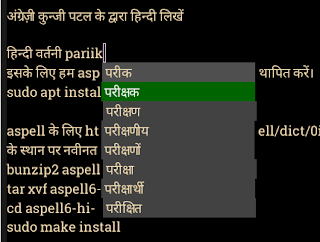
Note : This article is written using GNU Emacs. नोट : यह लेख GNU Emacs में लिखा गया है।   अब आप हिन्दी लिखने के लिए GNU Emacs का प्रयोग कर सकते हैं । गद्य सम्पादन के लिए Emacs एक बेहतरीन साधन है । हिन्दी के लिए देवनागरी फॉन्ट स्थापित करे आप Noto Sans Devanagari इस URL से प्राप्त कर सकते है। फिर root बनकर ये commands चलाए : # mkdir -p /usr/share/fonts/hindi # cd /usr/share/fonts/hindi # unzip NotoSansDevanagari-hinted.zip # fc-cache -fv अंग्रेज़ी कुन्जी पटल के द्वारा हिन्दी लिखें इसके लिए हम quail और company का प्रयोग करेंगे । Quail एक Input Method Framework है। यह अंग्रेज़ी कुन्जी पटल के keystroke को देवनागरी लिपि के Unicode अक्षरों में परिवर्तित करता है। इन अक्षरों को popup में दर्शाने के लिए हम company का प्रयोग करेंगे जो कि एक Completion UI Framework है। ~/.emacs में लिखें : (setq ispell-alternate-dictionary "/home/aspell6-hi-0.02-0/hi.wl")     हिन्दी वर्तनी परीक्षक इसके लिए हम aspell का प्रयोग करेंगे। aspell  स्थापित करें। sudo apt install aspell aspell के लिए...

Hindi Spell-check and Auto-suggest in Emacs

Image
  Spellcheck Install aspell sudo apt install aspell Install Hindi dictionary for aspell from https://ftp.gnu.org/gnu/aspell/dict/0index.html . Use the latest filenames instead of aspell6-hi-0.02-0.tar.bz2 in following commands. bunzip2 aspell6-hi-0.02-0.tar.bz2 tar xvf aspell6-hi-0.02-0.tar cd aspell6-hi-0.02-0/ ./configure make sudo make install Dictionary values are hard-coded in Emacs code. We need to query aspell for the newly installed dictionary. Add this in ~/.emacs (setq ispell-aspell-dictionary-alist nil) In Emacs, select Hindi dictionary via M-x ispell-change-dictionary. Then you can use spell check shortcut M-$ for Hindi. Side note: For some reason Indian fonts are not rendered correctly in the browsers in Linux. Changing the default fonts used by the browsers to Noto Sans Devanagari or Lohit-Devanagari solves it. Auto-suggest You can have auto-suggest for transliterated string by setting the following variable to the location of a word list (see Managing word li...

Transliteration in Emacs

Image
This is a combination of company (completion framework UI) and quail (Unicode input method) in Emacs. indian-dev-itrans-v5-hash defines a mapping between ASCII symbols (indian-itrans-v5-table) and target language Unicode symbols (indian-dev-base-table). It is defined as  (defvar indian-dev-itrans-v5-hash   (indian-make-hash indian-dev-base-table               indian-itrans-v5-table)) Quick Test (require 'ind-util) (setq company-i18n-input-hash indian-dev-itrans-v5-hash) (setq company-backends '(company-i18n)) (company-i18n 'trans "aa")   ;; Gives "आ"   Code: company-i18n Config: (add-to-list 'company-backends 'company-i18n) ;; Use appropriate hash for other languages. See files in emacs/lisp/language directory  (require 'ind-util) ;; Hindi (setq company-i18n-input-hash indian-dev-itrans-v5-hash) ;; Tamil (setq company-i18n-input-hash indian-tml-itrans-v5-hash) ;; Kannada (setq company-i18n-input-hash ind...

Semantic lexer based indent region function in Emacs

Image
  Here is a Semantic lexer based indent region function for formatting code in Emacs. It should work for Java and javascript. Feel free to use it if you like the output or customize it to suit your needs. Code: semantic-indent-region  Features Removes redundant whitespace. Multiple new lines are replaced by two new lines to mark paragraph separation. Adds spaces around punctuation characters. Uses tab for indent and fill-column width to wrap lines. Set values for tab-width and fill-column as per your preference. Uses first token as the anchor point and aligns the code to match the nearest tab-stop. e.g. if tab-width is 4 character, and first token is on 1-3 column, code will be aligned to first column. However, if first token is on 4th column, then alignment is not changed. Adds one indent for each level of nested code. Splits line on semi-colon.

GNU Emacs as a lightweight IDE (Java Type Hierarchy)

Image

GNU Emacs as a lightweight IDE (Outline view)

Image
Semantic tag outline display uses speedbar . The implementation is in semantic/sb.el . Speedbar also supports generic lists.  A generic list is of the form:  ( ("name" . marker-or-number)                <-- one tag at this level    ("name" marker-or-number goto-fun . args)  <-- one tag at this level    ("name" ("name" . mon) ("name" . mon) )    <-- one group of tags    ("name" mon ("name" . mon) ) )               <-- group w/ a position and tags    Java Ant build.xml C outline CSS outline HTML outline Latex outline Elisp outline Makefile outline Java Maven pom.xml outline Java Maven pom.xml outline 2 SQL outline Java outline