Posts

SVG widget in GNU Emacs

Image
  (Top) SVG sprite sheet (Bottom) widgets from sprite sheet (Left) SVG widget in Emacs buffer Now you can use SVG widget in GNU Emacs. That is, use an SVG image or fragment as background for push-button widget in Emacs buffer. You can also specify the width and height of the widget for finer control. Generally speaking, you can use any type of image for this purpose. But SVG suits best because you can draw widget of any size without any distortion.   The ability to use SVG fragment means you can define multiple symbols in an SVG and use the same as a sprite sheet or a symbol library for your UI requirements. Thus the number of files to be managed is reduced. An SVG symbol library is a simple SVG file with each symbol as a direct descendant of the root node. Video above shows an example of such usage. Another use case would be better looking customize form. Or at the very least, rounded "Save" and "Cancel" buttons. In other words, a more visually appealing UI in grap...

SPICE simulation in GNU Emacs

Image
Now you can manage and run SPICE simulation within GNU Emacs using ngspice. To visualize the output, the code uses ngspice control card to run gnuplot.   .emacs ;; Check the location of spice-mode.el (load "~/spice-mode.el") (setq spice-simulator "Ngspice"       spice-waveform-viewer "ngplot") ;; ngplot is a new custom viewer defined in elisp which uses gnuplot   Install ngspice and gnuplot # apt install ngspice gnuplot Download https://gitlab.com/atamariya/emacs/-/blob/dev/lisp/spice-mode.el . Load the file (load "~/spice-mode.el") Open a new buffer and activate mode using M-x spice-mode . Select simulator Ngspice and waveform viewer ngplot via menu or by setting variables (same as in .emacs above). Enter circuit definition. Run the simulation using C-c C-r (spice-compile). Go to error, if any, using 'next-error' ( M-x next-error or M-g n ). Plot the results using C-c C-v (spice-plot). Enter the fields (e.g. int out) to be plotted. S...

GNU Emacs as a lightweight PHP IDE

Image
  Auto-complete for PHP Auto-complete using company   This is a simple Proof-of-Concept for PHP auto-complete based on CEDET semantic. Given a semantic setup, addition of the following two files (Makefile.in changes too if grammar file should be compiled during build) should allow auto-complete as in above picture. PHP Grammar file: https://gitlab.com/atamariya/emacs/-/blob/php/admin/grammars/php.wy PHP mode definition: https://gitlab.com/atamariya/emacs/-/blob/php/lisp/cedet/semantic/php.el

Draw and Scribble Notes in GNU Emacs

Image
        SVG seems to be quite handy for quick note-taking. You can easily draw simple shapes, use symbols from an SVG library and augment it with some freehand drawing. Combined with excellent keyboard editing of Emacs, you'll not miss anything while taking notes. Code: https://gitlab.com/atamariya/emacs/-/blob/dev/lisp/svg.el   Installation When you are drawing programmatically, you need to be able to track nodes by unique ids. e.g. if you call (svg-circle) followed by (svg-rect) using the same id, you should end up with an SVG rectange node. With out of the box svg.el, you'll end up with SVG circle node with attributes from (svg-rect). Hence canvas mode will not work with out of the box svg.el as is.   Till my patch which addresses this issue is merged in Emacs core (see https://lists.gnu.org/archive/html/emacs-devel/2021-09/msg00798.html ), you'll need to add following commands in your init file (~/.emacs) to use it.   ;; Assuming you have downloa...

Sheet music in GNU Emacs

Image
Use "Bravura Text" font for music symbols. Use C-x 8 RET to enter music symbols. G clef is U+1D11E .  Staff is U+E01A . Notes are U+1D15F and U+E1D6 . Use display text properties to raise the symbols.  (put-text-property (region-beginning) (region-end) 'display '(raise 0.1)) Save the file in enriched-mode to preserve the formatting. To display raise text property, add the following in .emacs . (setq enriched-allow-eval-in-display-props t) Code: https://gitlab.com/atamariya/emacs/tree/dev Music Symbol reference: http://www.smufl.org/files/smufl-0.9.pdf

Basic WYSIWYG printing in GNU Emacs

Image
Unicode text (top) converted to PS file (bottom) Document printed using HP3545 printer Unicode RTL text (top) converted to PS file (bottom) ASCII text in Braille font (top) converted to PS file (bottom) Unicode CJK text (top) converted to PS file (bottom) Sheet music using Bravura Text (top) converted to PS file (bottom) Sudoko grid (top) converted to PS file (bottom) Text with fancy fonts (top) converted to PS file (bottom) Text file (left) converted to PS file (right) Welcome screen (left) with SVG image and font variations converted to PS file (right)   Full resolution JPG in image-mode (left) converted to fit in an A4 page (right)   Format a text file in text-mode. Please note that you need to use proportional font (aka variable pitch font) in the frame to have text with varying sizes.  DejaVuSans font is used in the screenshot. Also, be aware that font-lock-mode might interfere with the formatting. If you're unable to change formatting, try turning off font-lock-mod...

GNU Emacs में हिन्दी लिखें

Image
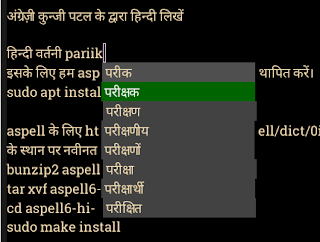
Note : This article is written using GNU Emacs. नोट : यह लेख GNU Emacs में लिखा गया है।   अब आप हिन्दी लिखने के लिए GNU Emacs का प्रयोग कर सकते हैं । गद्य सम्पादन के लिए Emacs एक बेहतरीन साधन है । हिन्दी के लिए देवनागरी फॉन्ट स्थापित करे आप Noto Sans Devanagari इस URL से प्राप्त कर सकते है। फिर root बनकर ये commands चलाए : # mkdir -p /usr/share/fonts/hindi # cd /usr/share/fonts/hindi # unzip NotoSansDevanagari-hinted.zip # fc-cache -fv अंग्रेज़ी कुन्जी पटल के द्वारा हिन्दी लिखें इसके लिए हम quail और company का प्रयोग करेंगे । Quail एक Input Method Framework है। यह अंग्रेज़ी कुन्जी पटल के keystroke को देवनागरी लिपि के Unicode अक्षरों में परिवर्तित करता है। इन अक्षरों को popup में दर्शाने के लिए हम company का प्रयोग करेंगे जो कि एक Completion UI Framework है। ~/.emacs में लिखें : (setq ispell-alternate-dictionary "/home/aspell6-hi-0.02-0/hi.wl")     हिन्दी वर्तनी परीक्षक इसके लिए हम aspell का प्रयोग करेंगे। aspell  स्थापित करें। sudo apt install aspell aspell के लिए...