Posts

GNU Emacs: A multimedia editor

Image
Ever wondered - what if multimedia editing were as simple as text manipulation? Simple cut, copy and paste operations. Thanks to VLC and FFMPEG, now you can use GNU Emacs for simple multimedia editing tasks. Code: https://gitlab.com/atamariya/emacs/-/blob/dev/src/xwidget.c https://gitlab.com/atamariya/emacs/-/blob/dev/lisp/xwidget.el https://gitlab.com/atamariya/emacs/-/blob/dev/lisp/media.el Concepts - Number denotes a file and an amount of time defined by a scale. e.g. if the scale is 10 seconds, digit 1 denotes 10s clip from file number 1. Corresponding file name is displayed in the dashboard. - Red coloured digit represents a fraction of scale time. e.g. if scale is 10s, it might represent 0-10 s clip. - Number denotes the start time of the clip. - Dot denotes a blank clip for an amount of time defined by a scale. - Whitespace is only a visual separator. - In the viewer window, use o for opening a file, e for exporting, SPC for toggling play, and RET for splitting the clip. - In th...

Your browser is spying on you

Image
It should come as no surprise that websites are snooping on its users. However what baffled me was that the browsers ( Mozilla Firefox, webkit and probably others) have joined their team. If your browser supports the navigator.sendBeacon() API, you should dump it right away (or atleast find a blocking mechanism).   API description from Firefox website     In the above screenshots, you can see the API in action for Webkit. Firefox doesn't even log these requests in developer console. The sad part - it's not easy to turn it off. For Firefox, you have to use some extension and hope it does what it advertises. This bug report says they don't even want to change the default. Even for Webkit which is supposedly just a rendering engine the way to turn it off is convoluted. You need to add a user script in the C code. Then in the user script JS, you need to override the function as below: navigator.sendBeacon = function(a){};   In comparison, look at this other API fo...

GNU Emacs: A configurable browser

Image
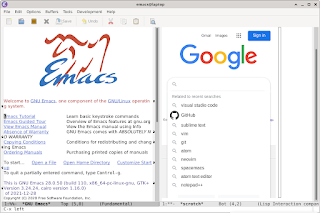
Now you can use GNU Emacs as a full featured browser. It uses webkit2gtk for rendering. Here's a short video demonstrating the features. Hit-a-hint Developer tools Features: - Adblock - Disabled tracking API (navigator.sendBeacon()) - Inline videos à la Youtube - Hit-a-Hint - Keyboard based navigation: left/right character for left/right scroll, prev/next line, prev/next page, beginning/end of buffer for top/end of page, +/-/z for zoom in/out/reset - Multi-input modes: single key interactive mode, line input mode via minibuffer and textarea input mode via new buffer - Password auto-fill and management via authinfo - Configurable Home page and search URL - Bookmarks - Download unsupported mime types - User script à la Tampermonkey / Greasemonkey - User styles - Developer tools / Web Inspector Finally you can have a browser as you want. Code: https://gitlab.com/atamariya/emacs/-/blob/dev/src/xwidget.c https://gitlab.com/atamariya/emacs/-/blob/dev/lisp/xwidget.el https://gitlab.com/a...

Hit-a-Hint : Didn't know I needed it!

Image
Hit-a-hint was originally developed as a plugin for Firefox. The plugin highlights the links on a webpage with an accelerator hint key. You can simply type the hint to visit the URL. How is this useful? If you notice, the hint consists of permutation of keys on the home row in the keyboard. So your link selection is typically limited to smaller number of keys which are repeated instead of all the keys if you were to select by the anchor text. This idea is implemented as a plugin for all the major browsers. For Emacs, you can use emacs-webkit . Have you tried browsing web using a keyboard? If you haven't yet, I suggest you give it a try.

Offscreen rendering in GTK

Image
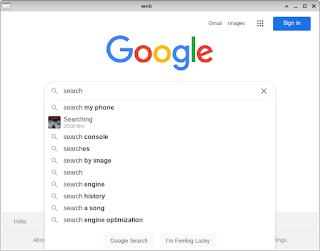
  GTK provides a simple OffscreenWindow API to render content offscreen and then paint a widget with that content on demand. This is important if you want to avoid flickering or don't want to show user the content till it's fully ready. The "draw" event handler of gtk_drawing_area_new widget widget draws webview widget on the cairo surface passed to the handler using gtk_widget_draw (GTK_WIDGET (webView), cr) . Keyboard, mouse and scroll events are copied and forwarded to the webview widget. We can listen to WebKitWebView 's "load-changed" event for blocklist managment. ./browser "http://www.google.com" browser.c #include <gtk/gtkx.h> #include <webkit2/webkit2.h> static gboolean refresh_widget (GtkWidget *widget, GdkEvent *event,                         gpointer xv_widget) {   if (GTK_IS_WIDGET (xv_widget))     gtk_widget_queue_dra...

Browser in GNU Emacs

Image
There are two ways to browse rich web on GNU Emacs - both of them involves xwidget. Notice the different symbols ( widget and socket ) passed to (xwidget-insert) command. Apart from the technical difference, widget is keyboard oriented and socket is mouse oriented from usability perspective. Inbuilt webkitgtk2 widget Since it's inbuilt (runs in same process as Emacs), it is better integrated with Emacs compared to the other option. There are keyboard commands to manage the browsing. Though this flickers a lot to suit my taste. Also, input handling is a bit cumbersome.   (setq w (xwidget-insert (point) ' webkit "test" 400 600)) External Surf browser Surf browser also uses webkitgtk2. It's the only browser which supports XEmbed protocol. This means you can use mouse and keyboard normally as you'd do while browsing web.   With my patch , you should be able to invoke surf as below:   (setq w (xwidget-insert (point) ' socket "test" 400 600 '(...

Build your own browser

Image
Build your own browser using GTK and webkit2. ./browser "http://www.google.com" To add content blocking, connect to the "decide-policy" signal and use webkit_policy_decision_ignore() . browser.c #include <gtk/gtkx.h> #include <webkit2/webkit2.h> int main(int argc, char* argv[]) {   // Initialize GTK+   gtk_init(&argc, &argv);   // Create an 800x600 window that will contain the browser instance   GtkWidget *window = gtk_window_new(GTK_WINDOW_TOPLEVEL);   g_signal_connect(window, "delete-event", gtk_main_quit, NULL);   gtk_window_set_default_size(GTK_WINDOW(window), 800, 600);        // Create a browser instance   WebKitWebView *webView = WEBKIT_WEB_VIEW(webkit_web_view_new());   gtk_container_add(GTK_CONTAINER(window), GTK_WIDGET(webView));   // Load a web page into the browser instance   webkit_web_view_load_uri(webView, argv[1]);   // Make sure the main window and all its contents are visib...