Posts

Text books in Emacs

Image
If you feel like reading text books (TEXT format) like those available via Project Gutenberg , Emacs can be a good tool. Customize your book reading experience with your favorite background, fonts and text size. (defun book-mode ()   (interactive)   (set-window-margins nil 20 20)   (set-window-fringes nil 0 0)   (setq line-prefix "      ")   (setq word-wrap t)   ) ;; Invoke the mode as below ;; M-x book-mode

Simplify your computing environment

Here are some guidelines which might help you ease your workflow on computers.   Status bar Some of the essential information you always want available in a status bar: Day, date and time Battery (on a laptop) Volume (Be aware of levels before starting multimedia) Wifi (Handy while switching networks) Bluetooth CPU and Hard disk usage (these provide you visual indicator of when the computer is busy and you should stop feeding it more commands) Workspaces (what applications are running in which workspace) Open applications (if you can't read the title on a minified window or it stops providing you useful information, don't open any more app in that workspace). These icons can also act as a progress indicator for the foreground task in the application. Applications menu Logout menu Quick launch Many people prefer to use desktop shortcuts for often used applications. However, this means you need to have access to desktop to launch those application. This is often not the case when...

Floating window in Emacs

Image
Now you can create a floating window in Emacs. For a quick demo, create vertical split windows (C-x 3). Then with point in right hand window, execute following command in mini-buffer. (progn (setq w (selected-window)) ( window-make-popup w 107 287))   Why prefer window over frame? An Emacs frame is created using X top level window. Hence Emacs frames don't share X11 resources. However, multiple Emacs windows are part of the same top-level window and hence share X11 resources allocated for the X top level window. Code: https://gitlab.com/atamariya/emacs/-/blob/dev/src/window.c https://gitlab.com/atamariya/emacs/-/blob/dev/src/window.h https://gitlab.com/atamariya/emacs/-/blob/dev/src/xdisp.c Lessons Learnt Emacs uses display optimization to reduce the amount of area that need to be repainted. redisplay() is the entry point for this logic (xdisp.c and dispnew.c). In most cases, it's only updating the position of point in the current line. Frame based display is used for termina...

Presentation/Slideshow in GNU Emacs

Image
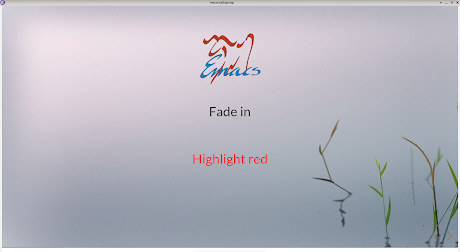
If you have xwidget webkit support in Emacs, you can run reveal.js presentation / slideshow within Emacs. RevealJs uses HTML. Hence you can make your presentation as fancy as you'd like with CSS and JS. Hopefully, this will save you from learning one more piece of software. The screenshot shows maximized mode. However, you should preferably run in fullscreen mode. You might want to get rid of redundant screen elements using the prez-mode function below.   (defun prez-mode ()   (interactive)   (delete-other-windows)   (setq mode-line-format nil     header-line-format nil)   (menu-bar-mode -1)   (tool-bar-mode -1)   (scroll-bar-mode -1)   (toggle-frame-fullscreen))  

Zen Emacs

Image
Here's a quick patch to set a pleasant background (PNG image) in Emacs. This needs GTK with cairo build (you need the cairo API cairo_image_surface_create_from_png()).       modified   src/xterm.c @@ -408,6 +408,8 @@ x_end_cr_clip (struct frame *f)      x_mark_frame_dirty (f);  }   +static cairo_surface_t *image; +  void  x_set_cr_source_with_gc_foreground (struct frame *f, GC gc)  { @@ -432,6 +434,10 @@ x_set_cr_source_with_gc_background (struct frame *f, GC gc)    x_query_colors (f, &color, 1);    cairo_set_source_rgb (FRAME_CR_CONTEXT (f), color.red / 65535.0,              color.green / 65535.0, color.blue / 65535.0); + +  if (!image) +     image = cairo_image_surface_create_from_png ( "/home/anand/back.png" ); +  cairo_set_source_surface(FRAME_CR_CONTEXT (f), image, 0, 0);  }    static const cairo...

GNU Emacs: A multimedia editor

Image
Ever wondered - what if multimedia editing were as simple as text manipulation? Simple cut, copy and paste operations. Thanks to VLC and FFMPEG, now you can use GNU Emacs for simple multimedia editing tasks. Code: https://gitlab.com/atamariya/emacs/-/blob/dev/src/xwidget.c https://gitlab.com/atamariya/emacs/-/blob/dev/lisp/xwidget.el https://gitlab.com/atamariya/emacs/-/blob/dev/lisp/media.el Concepts - Number denotes a file and an amount of time defined by a scale. e.g. if the scale is 10 seconds, digit 1 denotes 10s clip from file number 1. Corresponding file name is displayed in the dashboard. - Red coloured digit represents a fraction of scale time. e.g. if scale is 10s, it might represent 0-10 s clip. - Number denotes the start time of the clip. - Dot denotes a blank clip for an amount of time defined by a scale. - Whitespace is only a visual separator. - In the viewer window, use o for opening a file, e for exporting, SPC for toggling play, and RET for splitting the clip. - In th...

Your browser is spying on you

Image
It should come as no surprise that websites are snooping on its users. However what baffled me was that the browsers ( Mozilla Firefox, webkit and probably others) have joined their team. If your browser supports the navigator.sendBeacon() API, you should dump it right away (or atleast find a blocking mechanism).   API description from Firefox website     In the above screenshots, you can see the API in action for Webkit. Firefox doesn't even log these requests in developer console. The sad part - it's not easy to turn it off. For Firefox, you have to use some extension and hope it does what it advertises. This bug report says they don't even want to change the default. Even for Webkit which is supposedly just a rendering engine the way to turn it off is convoluted. You need to add a user script in the C code. Then in the user script JS, you need to override the function as below: navigator.sendBeacon = function(a){};   In comparison, look at this other API fo...