Posts

Zen Emacs: First Look

Image
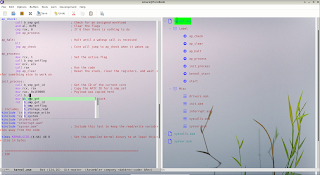
  Zen is a minimal Emacs ( pl. Emacsen ) with multi-thread support . It is a fork of Zepl . (Edit 3/9/23: Zen Emacs is a better name compared to Zep). Demo The video demonstrates: Split window Indirect/cloned buffer - same content but different points (cursor) Asynchronous shell command (top) execution and view update Parallel editing while the command runs in the other window   Components Zepl - Editor backend tinylisp - Lisp interpreter ncurses - Terminal UI Code https://gitlab.com/atamariya/tinylisp (dev branch)  
Tinylisp and Multi-threaded Emacs

Image
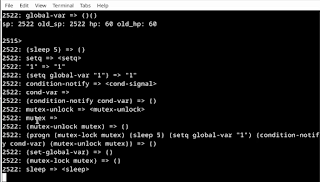
TAME-ing the beast!! Here's a fork of tinylisp and a glimpse of a possible multi-threaded future. Below is the content of the file a.el in the demo. It creates one read thread which waits for non-nil value of global-var and a set thread which sleeps for 5s before modifying global-var and notifying the waiting threads. Since these are running in separate threads, main loop is free for user input. (define list (lambda args args)) (define defun (macro (f v . x) (list 'define f (list 'lambda v (cons 'progn x))))) (setq make-condition-variable make-cond) (setq condition-wait cond-wait) (setq condition-notify cond-signal) (setq message p) (setq sleep-for sleep) (setq global-var nil) ;; Create a mutex and an associated condition variable (setq mutex (make-mutex "mutex")) (setq cond-var (make-condition-variable mutex "cond-var")) ;; Read and set functions used by read and set threads (defun set-global-var ()   (mutex-lock mutex)   (sleep 5)   (setq global-...

GNU Emacs as a lightweight IDE - Assembly

Image
CEDET support for Assembly language Auto-completion using company and speedbar outline view Jump to label Jump to include file Auto-completion using company Speedbar outline view     ASM file extensions supported - .s, .S and .asm   Grammar file: https://gitlab.com/atamariya/emacs/-/blob/dev/admin/grammars/asm.wy

Molly Kernel

Image
Molly kernel is a bare kernel (32kB size) for x86 based on JamesM's kernel development tutorials for learning purpose. It also adds keyboard support from Bran's kernel development tutorials .   Build The original version of the code is in master branch . The modifications (bug fixes + enhancements) are in dev branch .   ;; Pre-requisites sudo apt install nasm gcc make kvm bochs   git clone https://gitlab.com/atamariya/molly.git make -C src ./update_image.sh ./run.sh     ;; Optional ;; Run floppy image kvm -fda floppy.img     ;; Run CDROM ISO image kvm -cdrom img.iso ;; Run kernel binary kvm -kernel src/kernel -initrd initrd.img     Debugging You can use GDB to debug the kernel while executing it under qemu. Start qemu with "-s -S" flags and attach GDB remote session using "target remote localhost:1234". Make sure you match the architecture (i386 in this case) for qemu command and the kernel.   qemu-system- i386 -kernel src/kernel...

Meta git (mgit)

Image
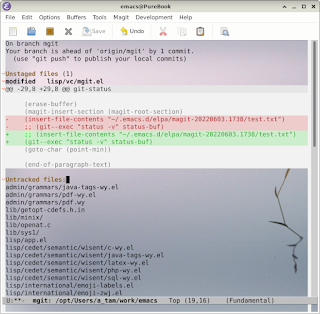
  Meta git (mgit) is a wrapper around magit , which is a wrapper around git . If the output looks familiar, it's because it's the output from command git status -v. For the discerning eye, it uses the font-lock defaults from diff mode (notice the highlight on ;;). diff-mode uses repeated diff commands to highlight the refinements. Use diff-mode or diff-refine-hunk if you must have the eye-candy. Motivation Magit is a handy tool for working with git repository in GNU Emacs. However, if you work with a large enough repository, you'll hit a performance road-block. Here's an attempt to deconstruct the problem and find a solution. Magit provides an information rich dashboard for git status. However, this comes with multiple calls to git command. If you run M-x magit-toggle-verbose-refresh and then run magit-status, you'll see the following output: Refreshing buffer ‘magit: src<anand>’...   magit-insert-error-header          ...

Git graph in GNU Emacs

Image
  Get a decent view of git tree in GNU Emacs (M-x magit-pg-repo ). By default, it draws the graph with last 100 commits. If you want a different behaviour, edit the following constant. (defconst magit-pg-command   (concat "git --no-pager log --branches --decorate=full "           "--pretty=format:\"%H%x00%P%x00%an%x00%ar%x00%s%x00%d\" "           " -n 100 ")   "The command used to fill the raw output buffer.")     If you want to use the script in terminal ( temacs -batch -l $PWD/magit-pretty-graph.el -f magit-pg-repo ), add the following path (adjust for versions) to the top of the script and uncomment line 238. (setq path '("~/.emacs.d/elpa/magit-20220603.1738/"          "~/.emacs.d/elpa/compat-28.1.1.1/"          "~/.emacs.d/elpa/dash-20220602.2113/"          "~/.ema...

GNU Emacs as a LISP interpreter

Image
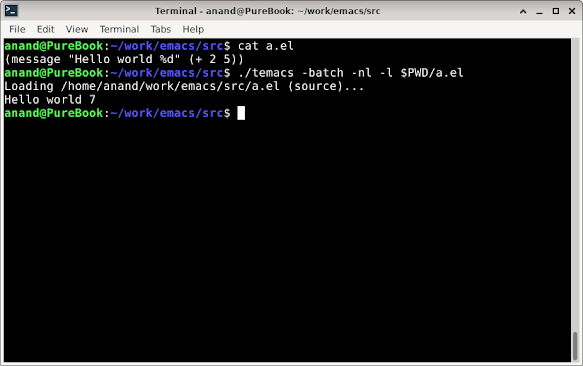
  After applying the following patch, you can run GNU Emacs as a standalone LISP interpreter for batch usage. It basically disables the command loop and non-essential symbols in batch mode.   temacs is Emacs sans any bootstrap elisp code. It is the first artifact generated during the Emacs build process. So you might not find it in your package installation. You can use the emacs binary too for the same effect - just understand that underneath they are not the same.   modified   src/keyboard.c @@ -1067,6 +1067,7 @@ command_loop (void)      while (1)        {      internal_catch (Qtop_level, top_level_1, Qnil); +    if (!noninteractive)      internal_catch (Qtop_level, command_loop_2, Qnil);      executing_kbd_macro = Qnil;   @@ -2631,9 +2632,9 @@ read_char (int commandflag, Lisp_Object map,    if (minibuf_level == 0  ...